With vSphere 5.5 now out, it was time to refresh my lab. I have ESXi 5.5 installed on a DL160 G6, with 1 SSD and 3 SATA drives, so I decided to make a single node VSAN instance. (3 nodes is a minimum for a supported configuration).
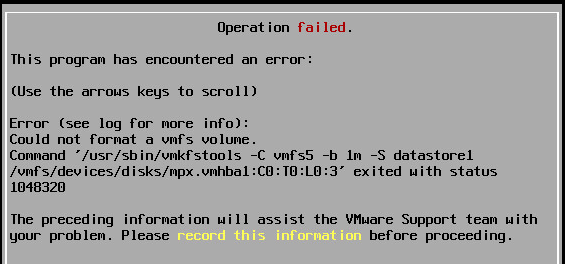
The plan was to spin up some nested ESXi instances, like my usual lab setups, but I ran into a problem. I could not get ESXi 5.5 to install - it kept failing. Here is what I was receiving:
This program has encountered an error:
Error (see log for more info): Could not format a vmfs volume. Command ‘/usr/sbin/vmkfstools -C vmfs5 -b 1m -S datastore1 /vmfs/devices/disks/mpx.vmhba1:C0:T0:L0:3’ exited with status 1048320
Thinking my ISO download was bad, I tried again, this time with the download manager, and even checked MD5 sums. Everything seemed fine, but still the error.
After rebuilding the VM a couple times, I decided to put the VM on my NAS instead of the VSAN - success! After much testing:
You cannot install nested ESXi 5.5 on the VSAN datastore!
Now, I had no problem using Storage vMotion to move the VM over to the VSAN datastore, and it has had no issues. So, long story short - you will have to pick a different datastore for the initial install of ESXi.
Why does it fail during install? So far, I have not found a reason. Again, this is all for lab purposes, and completely unsupported.
\\ Update**
William Lam reached out to the VSAN team at VMware and was able to find out why this was happening. See his post here . What he found was basically, when ESXi is installing, it tries to create a local VMFS volume, and when it does it uses a SCSI-2 reservation. VMFS5 however, doesn’t use SCSI reservations anymore - so with VSAN, they were removed. Here’s the fix to emulate the SCSI reservation:
esxcli system settings advanced set -o /VSAN/FakeSCSIReservations -i 1
This needs to be run on each host in the VSAN cluster - a reboot is not required.