
Recently, I had a pair of Data Domains that were having replication issues. After the offsite was seeded, and taken to it’s location - we noticed that the pre-comp remaining value would get down to 150 GiB or so, and then would jump back up to it’s original number of about 2,300GiB.
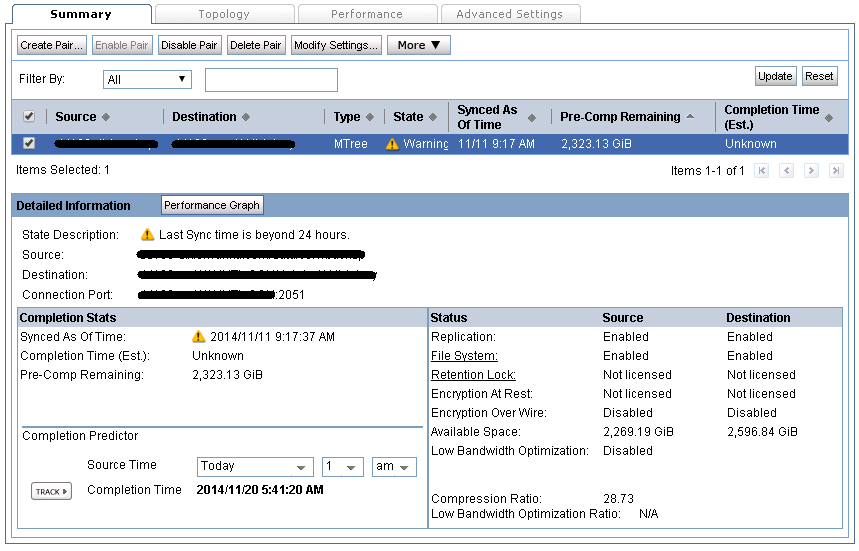
What was happening is the replication was starting over, because it lost communication with the other Data Domain.
So, what’s the problem? Well, the first thing to check is your network.
- Dropped pings?
- Firewalls?
- Packet filtering / IPS / AV inline?
In this case, we had no devices inspecting the packets. (It’s possible for the replication traffic to randomly match an AV definition, and the firewall would discard it - causing the Data Domain to restart replication due to the loss of data).
The next step was to modify our Keep Alive values.
- Putty into the Data Domain
- Type System Show SerialNo
- To enter SE mode, type Priv Set SE
- Use the serial number of the device as the password
We will change 3 values (per EMC support’s direction).
- net.ipv4.tcp_keepalive_time
- The interval between the last data packet sent (simple ACKs are not considered data) and the first keepalive probe; after the connection is marked to need keepalive, this counter is not used any further
- net.ipv4.tcp_keepalive_probes
- The interval between subsequential keepalive probes, regardless of what the connection has exchanged in the meantime
- net.ipv4.tcp_keepalive_intvl
- The number of unacknowledged probes to send before considering the connection dead and notifying the application layer
While in SE mode, enter the following commands
- net option set net.ipv4.tcp_keepalive_time 300
- net option set net.ipv4.tcp_keepalive_probes 9
- net option set net.ipv4.tcp_keepalive_intvl 30
This will not require a reboot, however, existing TCP connections are not affected, so we will need to restart our replication. Exit SE mode.
- Replication Disable All
- Replication Enable All
At this point, you can monitor the replication, and most likely, the issue will be taken care of - assuming no physical network issues.
To monitor performance from the cli, type:
- iostat 2
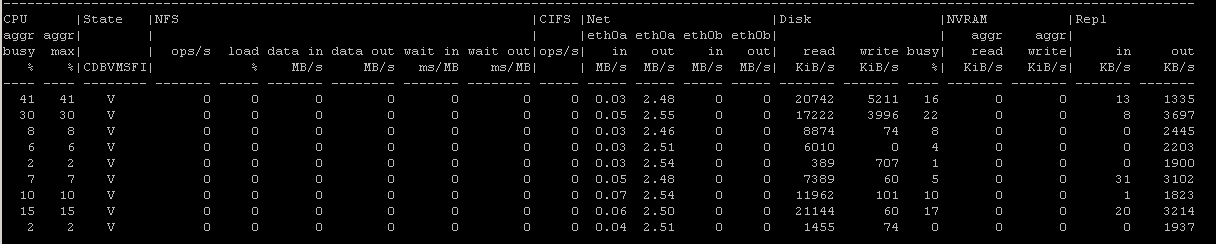
After a night of replication, the job finally finished successfully, and replication is now in a normal state.