
Recently, I have been playing around with Windows 8. And, since it went RTM on Aug 1st, I figured I would install it fresh. I downloaded Windows 8 Pro from my subscription, and made sure to copy down my license key.
The install went quick and painless, and I decided to sign in with a windows live account to test the functionality of that vs a local account. When I went to change my account picture, I received a message that I can’t customize my account until windows is activated.
OK – so lets goto the control panel and activation. However, I could not find anywhere to input a key. Windows did not ask for one during install, and apparently won’t let me enter one. The “change product key” option that we saw in Windows 7 is non-existent.
He’s the skinny – since the Pro and Enterprise version are geared for business, it’s assumed that you are going to use a deployment server, a KMS server.
So, how do you enter a key? The command prompt…..
Open an Elevated command prompt, and type the following:
slmgr.vbs -ipk “Enter Key Here”
Edit: It appears there is yet another solution:
From the command prompt, or run dialog box, type:
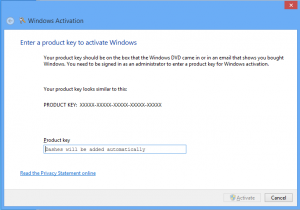
slui 3
This will bring up the Activation wizard, and allow a product key to be entered.



What are your feelings on Windows RT? Also what theme are you using for your pages layout? Nice write up.
Thanks, the theme I am using is called “Light Clean Blue”.
Windows RT is a good idea, and will be great for Surface, with a version of Office also able to run on ARM. I am looking forward to the x86 version of surface early next year – but sales should be good with RT. I see a lot of vendors using it on TV related devices as well as tablets.
Perfect fix!. Thanks!
Much appreciated!
Fantastic. Worked a treat 🙂
Highly appreciate. It works!
Genius! I was having this exact issue and the SLUI 3 program worked like a charm. Thanks for all of your help.
Thanks!
Worked for me perfectly. You are a better tech than the Microsoft Tech’s I was on the phone with them 1.5 hrs and still no activation. Thanks!!
I have been through tech support and we did what you have listed here and every thing was fine for a few hours, but now I am having the same problem and it won’t go away.
I bought a valid copy! I try to refrain from cursing but this is getting real stupid, so wtf microsoft?
I am sorry but I had to vent. I have activated and reactivated numerous times as well as refreshed the system and still no activation.
Any thoughts on the matter, because I don’t think tech support can figure it out either.
Try installing fresh, and not a refresh of the system. (or in a virtual machine). If it still does not activate, or attempts to re-activate, contact Microsoft and request a replacement license key.
I tried both and the slui 3 solution almost worked except when I put in the activation key that I received it tells me “Windows couldn’t be activated Error Code: 0x8007007B Error description: the filename, directory name, or volume label syntax is incorrect.” I have no idea what to do now, any ideas?
Run the following from an elevated command prompt:
Make sure to not include the quotation marks.
thanks woked great